





You need an account to access this content
Create a free account and get access to all downloads and more!

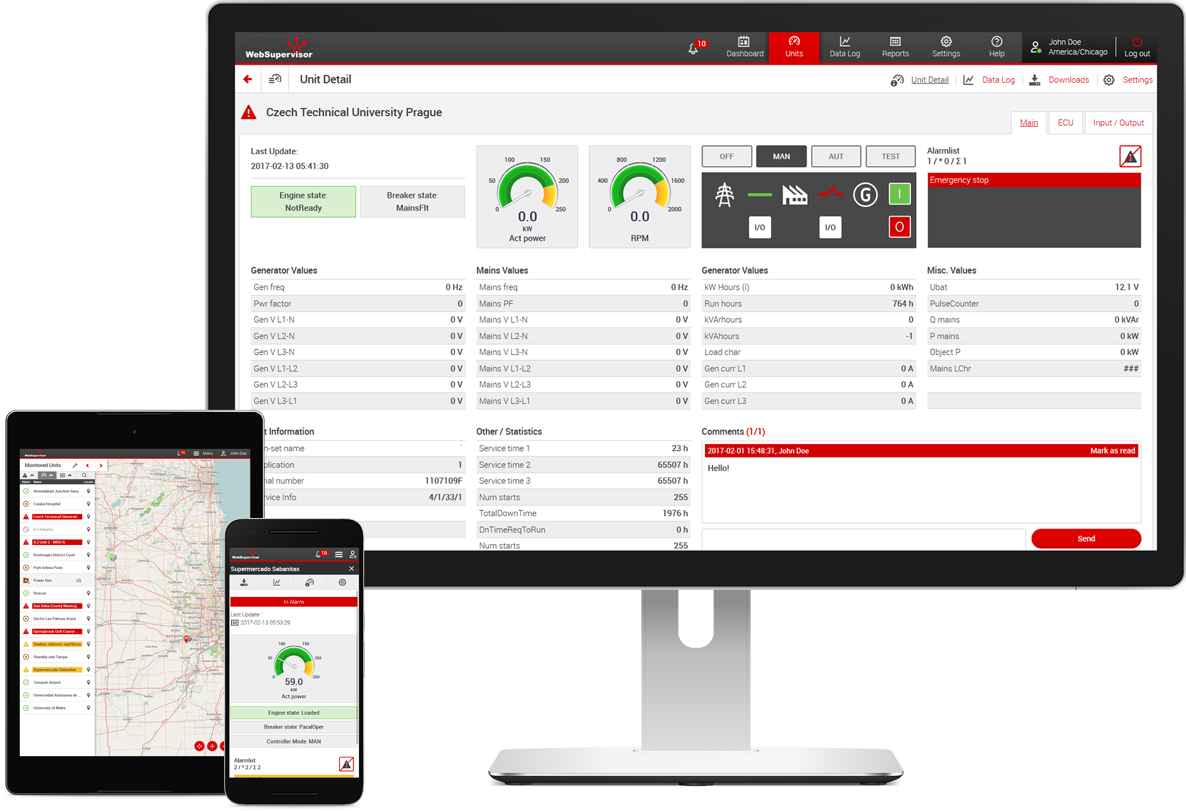
WebSupervisor is a Cloud-based service that enables remote monitoring, management and analysing of a gen-set fleet and 3rd party devices from anywhere. The Comap Cloud API, as part of WebSupervisor, enables custom data integration into 3rd party business management software.
The ComAp Cloud API lets you seamlessly access actual and historical data from ComAp devices and use it in your own applications. Whether you want to build advanced BI dashboards, integrate with your CRM or ERP system, our API gives you the flexibility to create solutions that match your needs. From triggering actions based on device data to enriching your internal systems with live operational insights - the possibilities are endless.

Dashboard
Easily view and navigate to common points of interest on WebSupervisor. The Dashboard displays an overview of important information, such as alarms, power output, engine state and lists of controller groups.
Device, Group and User Management
Control your units, groups and account users. With WebSupervisor's management feature, units and groups can be added, removed, disabled, among other actions. Users can be selected to receive reports; roles can be created and assigned; activity is logged and monitored.
Screen Editor
Modify screens of the web application according to your needs. The Screen Editor offers many instruments, such as analogue meters, site diagrams, breaker buttons, and even the ability to display a webcam live-feed.
Branding
Match the appearance of WebSupervisor to that of your own company's corporate identity. Pro users can display a company name or logo at the top of the page and use hexadecimal colour codes to change the website's buttons, menus, links, and text.
Extended Controller Interactions
Interact with units from a distance to perform complex tasks. WSV Pro users can connect to InteliConfig and other PC tools, download controller history, and even change setpoints through the web application.
Webcontrol
A simple tool in functionality but powerful in application, Webcontrol allows users to group certain controllers together, which can then be started and stopped together.
Event Triggers
Create and define custom triggers that will send a notification when the trigger is activated. Receive alerts for events like fuel level warnings, units going into "no communication" mode, or gensets reaching their preset limits of starts.
Reports
Generate weekly or monthly customised reports of important values. The reports feature makes it easy to invoice your clients according to datapoints like power level and running hours, or to give your own organisation an overview of information regarding fuel consumption or energy production.
Alarm Analyser
Monitor frequent alarms to reduce potential maintenance costs and increase genset uptime. Alarm Analyser evaluates alarms during a selected period and generates a report on which alarms occured, their frequency, and their duration.
Trends
Visualise the historical data of a unit's values. Controller Objects such as voltage, kW generated, and frequency can be displayed on line graphs, bar graphs, heat maps or tables. The tabs function lets you save graphs or tables to be quickly read again at each log in.
ComAp Cloud API
Activate access to the API and gain programmatic access to controller data. Automate the creation of detailed reports, or integrate WebSupervisor into other business management software tools, such as CRM, ERP, and PowerBI. Go to the API portal where you can read the documentation and learn how to implement it into your operations.
Security is our top priority. WebSupervisor runs on Microsoft Azure servers, which is one of the world's most widely used and well-secured servers. The user management and permissions functionality combined with the user activity logger provides another layer of security monitoring for the user's peace of mind.
Multifactor Authentication
WebSupervisor offers login protected by multifactor authentication. Activation of MFA is voluntary. In order to use multifactor authentication to log into your WSV account, it is necessary to register a ComAp cloud identity first.
Tracking and Geofencing
Keep track of the live location of controllers with the supporting technology. Websupervisor can display where units are, where they've been, and limit operation to within pre-defined areas. While the Geofencing feature is available to everyone (if supported by controller), the Tracking feature is only for our PRO users.
User Activity Logger
Administrators of an account can see the history logs of every user, so they can check every user's actions in order to identify who was monitoring a device when an issue occurred.
WebSupervisor's Add Ons are powerful tools and enhanced features that grant users further control of their units and installations. From URL customisation to complete API integration, WebSupervisor's Add Ons can optimise your fleet to its full capabilities. Contact your local ComAp representative to discuss which add-ons are best for you.
Advanced branding
Strengthen your corporate identity with WebSupervisor's branding tools. Upload a logo and adjust the colours to match your company's iconic palette. Set up a custom URL and login page to give your customers the confidence they're in friendly hands.
ComAp Cloud API
Fully customisable programmatic access for data acquisition that can be seamlessly integrated into 3rd party business management software.
Refresh data period change
With refresh rates as fast as a couple of seconds, you can get updates from your controllers in near real-time, allowing you to respond more quickly to new developments in the field.
Extend data availability
WebSupervisor can extend the storage period of your devices' data, making it possible to create more detailed reports.
Extension of online connections
Expanding the number of simultaneous connections to the same account from 10 to 25 allows more of your technicians to keep a watchful eye on your assets at all times.


devices operated
WSV users worldwide
hours online
 LITE LITE
|
 PRO PRO
| |
|---|---|---|
| Number of monitored assets | up to 10 000 | up to 10 000 |
| Number of online connections to account | 10 | 25 |
| ComAp Cloud Indentity | ✓ | ✓ |
| Multifactor authentication (MFA) | ✓ | ✓ |
| Device overview (list and map view) | ✓ | ✓ |
| User, device and group management | ✓ | ✓ |
| Notifications and alerts | ✓ | ✓ |
| Sharing units and groups | × | ✓ |
| Data refresh period (online/offline) | 1 min/1 hr | 5 s/1 min* |
| Support of 3rd party devices via InteliGateway | × | ✓ |
| Dashboard | limited | ✓ |
| Event trigger | × | ✓ |
| Alarm analyser | × | ✓ |
| User activity logger | × | ✓ |
| Reports | × | ✓ |
| Enhanced trends | × | ✓ |
| Tabs for trend saving | 2 | 5 |
| Data for trends/device tracking | 3 months | min. 12 months |
| Geotracking | × | ✓ |
| Geofencing | ✓ | ✓ |
| Screen Editor | × | ✓ |
| Basic branding (logo, application colours) | × | ✓ |
| Add-ons | × | Contact us for detailed options. |
* with activated add-on
The advanced monitoring features of WebSupervisor are especially useful for packagers and rental fleet operators. With WebSupervisor's full capabilities, users can:

Our customers can get the most out of their Hybrid Micro Grids to maximise renewable energy production. WebSupervisor's monitoring tools help to save fuel consumption and decrease CO2 emissions.

The many reporting and management tools within WebSupervisor allow operators to ensure that each cogeneration plant is operating at peak efficiency and generating the most revenue possible.

Operators of telecom towers (or BTSs) can find additional benefits in using WebSupervisor in their installations. The analysis, reporting and monitoring features allow technicians to ensure that their towers are all functioning within operational parameters, whilst also providing integration with other third-party devices which can make WebSupervisor an all-in-one solution for monitoring and management of BTS towers.

We care about our customers, we will answer any questions you may have.
.jpg?f=Avif&w=3840&h=2000&q=70&v=638050070457820636)
Your operation depends on everything running smoothly. Our experts are here to make sure of that. We offer:

Didn't find what you were looking for? Contact us, we’ll be happy to answer any questions you may have and help you with your business needs.
Interested in another country? Find your local representative.